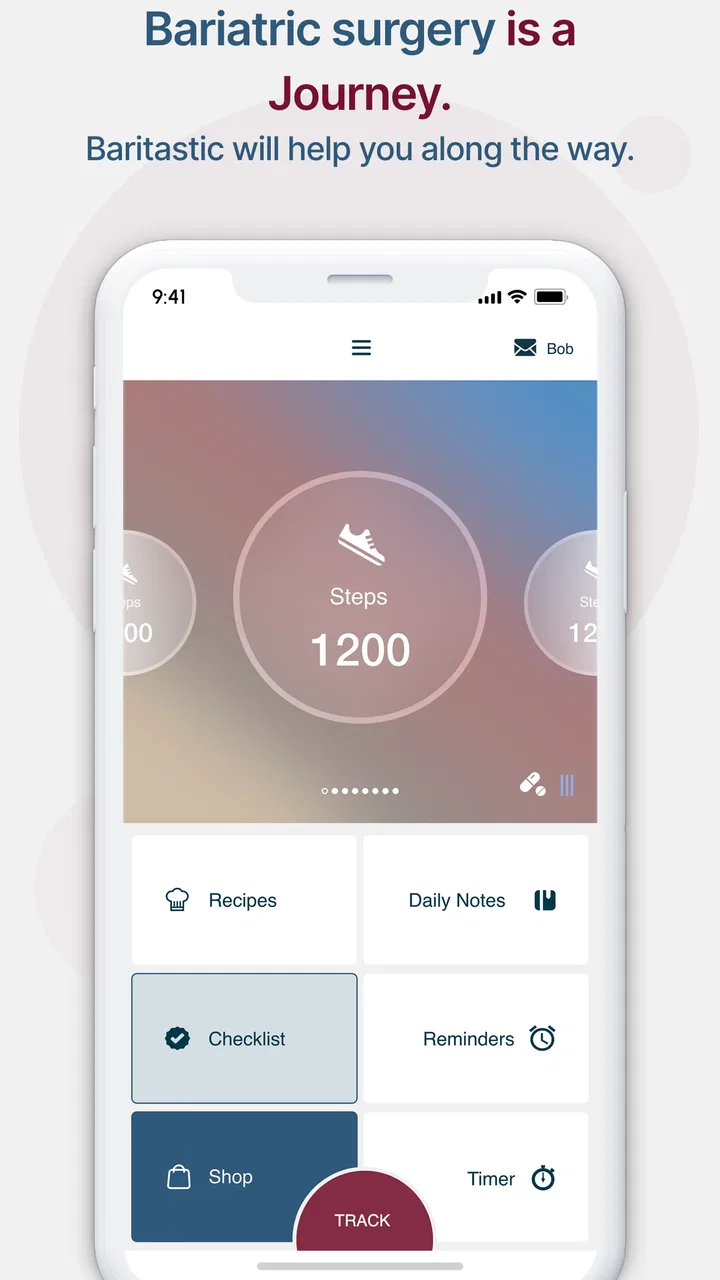
Baritastic - Bariatric Tracker
- 4.6
- Rating
- 500.00K
- Installs
- Free
- Price

 Analysis by App-foxy
After bariatric surgery, the difficult part is rarely remembering that health matters. The difficult part is recording small details while life keeps moving: what I ate, how much I drank, whether I took a supplement, how my weight changed, and how I felt afterward. Baritastic is built around that daily reality. It is a free medical app from BariApps designed for people tracking gastric bypass, gastric sleeve, lap band, and balloon procedures.
I found its strongest quality in the way it turns scattered recovery tasks into one repeatable routine. Instead of keeping a food diary in one place, weight notes somewhere else, and reminders in a separate calendar, I can use one bariatric-focused tracker as my daily reference point. That does not make recovery effortless, but it reduces the mental load of deciding what to record and where to look later.
The app has been available since September 4, 2014, and its current version is 2.3.0. Its audience is clearly established: the app has passed 500K installs, with a 4.7 average from around 26K ratings and roughly 13K written reviews. Those figures do not replace medical advice, but they do suggest that this is not a niche experiment with no real user history.
You May Also Like

 Blood Strike: 2.5 Anniversary
Blood Strike’s Loadouts Turn Every Drop Into a Tactical Gamble
A close look at Blood Strike’s custom loadouts: how fast access to signature weapons reshapes its battle royale rhythm, rewards preparation, and narrows the gap between fights.

 Pandora - Music & Podcasts
Pandora’s Music Is Easy to Start, but Harder to Recover
Pandora’s strength is its low-effort path from a seed to a station. Its weak spot is how much confidence it asks you to place in connection, setup, and quiet recovery.

 8 Ball Pool
 Is Built on Rivalries, Rematches, and Routine
A close look at the rivalries, rematches, shared routines, and unanswered safety questions that turn a quick pool match into a persistent mobile community.

 Samsung Music
’s Quiet Strength Is Playing What You Already Own
Its reach comes less from spectacle than from dependable access to a personal library. That simplicity is both the app’s strongest retention engine and its ceiling.

 AccuWeather: Weather Radar
AccuWeather Review: A Quick, Clear Forecast for Everyday Decisions
For everyday plans, the best forecast is the one you can understand quickly. AccuWeather makes rain timing, radar, and local conditions easy to act on, with a few trade-offs.

 Hill Climb Racing
Why Hill Climb Racing Still Turns Crashes Into One More Run
A tiny car, a bumpy hill and one more upgrade: Hill Climb Racing keeps resurfacing because its simple chaos makes every near-miss feel personal.
More From Our News Desk



Building a baseline routine that I can actually maintain
My preferred way to start with Baritastic is not to enter every possible detail immediately. The better approach is to create a baseline routine that takes only a few minutes and can survive busy days. I would begin by recording meals, fluids, weight, and the health tasks that my clinical team has asked me to monitor. Once that feels automatic, I would add more detail only where it helps answer a real question.
This matters because a tracker can become counterproductive when every entry feels like paperwork. Bariatric recovery already involves many instructions, and an app should make those instructions easier to follow rather than turn them into another source of guilt. A simple, consistent record is usually more useful than an ambitious log abandoned after a week.
A realistic morning might involve checking the day’s planned tasks, recording a weigh-in if that is part of my routine, and noting fluids as I go rather than trying to reconstruct them at night. During meals, I can capture what I ate while the information is still fresh. In the evening, I can review the day and notice whether low fluid intake, missed supplements, or an uncomfortable meal pattern needs attention.
The important distinction is between tracking and judging. I use the app to spot patterns, not to treat one unusual meal or one higher scale reading as a verdict. Weight can fluctuate, appetite can change, and recovery is not perfectly linear. The useful question is whether the record helps me have a clearer conversation with my surgeon, dietitian, or other healthcare professional.
Choosing what deserves a place in the log
Food tracking is most valuable when the entries are specific enough to teach me something. A vague note such as “lunch” is less helpful than identifying the food, approximate portion, and any reaction I noticed. I do not need to write an essay for every meal. A short, repeatable entry can reveal whether certain foods are difficult, whether I am spacing meals sensibly, or whether I am relying too heavily on convenient options.
Fluid tracking deserves the same practical approach. Rather than waiting until bedtime and guessing, I would log drinks throughout the day. That habit makes the app useful as a running check rather than a retrospective estimate. It also exposes a common problem: a person may feel they have been drinking regularly while still ending the day far below the amount recommended by their care team.
Weight entries are best viewed as a trend record. I would try to use a consistent routine when weighing, because changing the time or circumstances can make normal variation look more dramatic. Baritastic can organize the information, but it cannot interpret every fluctuation or tell me whether a change is medically important. That boundary is essential.
I also like the idea of using notes selectively. If a meal caused discomfort, if I struggled with a supplement, or if a symptom appeared after a change in routine, a brief note can preserve context that numbers alone cannot. The trade-off is that detailed notes take longer, so I would reserve them for events that might be useful at an appointment or when reviewing a recurring pattern.
Settings and habits worth checking before daily use
A common mistake is to open a health tracker and start entering information without first making the routine fit personal circumstances. With Baritastic, I would check the available profile and tracking settings carefully and align them with the instructions from my bariatric team. The app should support the plan I have been given, not silently replace it with a generic target.
This is especially important because bariatric programs can differ in timing, portions, supplements, and progression between stages. A setting that looks reasonable in isolation may not match my surgeon’s instructions. I would treat the app as a convenient recording tool and confirm medical targets with the professionals responsible for my care.
The most useful setup is the one I can repeat without negotiating with myself. If the app allows a choice between many kinds of tracking, I would prioritize the items my team actually reviews. For one person that may mean fluids and supplements; for another it may mean meal tolerance, weight trend, or symptoms. More fields are not automatically better.
I would also decide in advance when entries happen. Logging immediately after eating is usually more reliable than postponing everything. A reminder, where available and appropriate, can help with routine tasks, but notifications should not become background noise. If alerts are too frequent, I am more likely to dismiss all of them, including the useful ones.
Another worthwhile habit is reviewing the app before an appointment rather than opening it for the first time in the waiting room. I can look for repeated difficulties, prepare questions, and identify days where the record is incomplete. That makes the consultation more focused. It also prevents the common temptation to present a polished but inaccurate summary made from memory.
Using the app without letting it take over
There is a fine line between accountability and obsession. A tracker can be reassuring when it shows that I am following a routine, but it can become stressful if every missed entry feels like failure. I would use the app as a support system, not as a test I must pass perfectly.
For example, if I forget to record a drink, I would not invent a precise number just to make the day look complete. An honest partial record is more useful than false accuracy. Likewise, I would avoid changing entries simply to create a better-looking trend. The value of a medical log depends on whether it reflects what actually happened.
Privacy also deserves practical attention. Because this is a medical tracker, I would review the app’s permissions and the way I handle the device, especially if other people use the phone. I would avoid entering information that does not help my care plan, and I would remember that an app is not the same thing as a protected conversation with a clinician.
Faster patterns experienced users can maintain
The best efficiency improvement is batching without postponing everything. I would record each meal and drink close to the moment it happens, then reserve one short review period for the end of the day. That keeps the details fresh while avoiding constant phone checking. It is faster than trying to reconstruct the entire day from memory.
Another useful pattern is repeating familiar entries when the same foods appear often. Bariatric routines frequently include dependable breakfasts, protein choices, supplements, or drinks. If the app supports selecting previously used items, that can reduce typing and make consistency easier. I would still check the portion and preparation rather than blindly repeating an old entry, since small changes can matter.
For meals that cause problems, I would create a more deliberate record: what I ate, how quickly, how much, and what I felt afterward. This is one of the less obvious ways a tracker becomes clinically useful. The goal is not to diagnose myself. The goal is to give my healthcare team a clearer timeline than “that food did not agree with me.”
I would also use weekly review as a learning exercise rather than a scorecard. Looking across several days can show whether I am regularly missing fluids, skipping a supplement, eating too quickly, or struggling at a particular time. A single day can be misleading; a repeated pattern gives me something actionable to discuss.
When traveling or returning to work, I would simplify the routine before the schedule becomes chaotic. Keeping a small set of dependable foods and drinks in mind, logging as soon as practical, and reviewing the day later can preserve continuity. The app is most helpful when it travels with the habit, not when it becomes another task that disappears during busy periods.
Where it is more useful than ordinary alternatives
A plain notes app is flexible, but it makes me design the entire system myself. A spreadsheet can be powerful, especially for people who enjoy customizing formulas and charts, yet it demands maintenance. A general calorie tracker may have a broader food database, but it may not reflect the priorities of bariatric recovery as directly.
Baritastic’s advantage is focus. Its purpose is not to be an all-purpose wellness dashboard. It is aimed at the specific combination of surgery-related food, fluid, weight, and routine tracking. That focus can make the first setup less intimidating for someone who does not want to build a personal spreadsheet after surgery.
The trade-off is that a focused tracker may not satisfy someone who wants extensive athletic metrics, broad nutrition analysis, or a fully customizable database. If my main goal were detailed sports nutrition or general calorie planning, I might prefer a more specialized alternative. If my main goal were bariatric follow-through, the narrower scope is a strength.
Advanced limits and situations where I would be cautious
Baritastic is a tracker, not a substitute for a surgeon, dietitian, emergency service, or diagnostic tool. I would not use a reassuring-looking log to dismiss severe pain, persistent vomiting, dehydration, unusual bleeding, or another urgent concern. Those situations call for professional medical guidance, not better data entry.
I would also be cautious about treating app targets as universal rules. Recovery stages differ, and my own instructions may change over time. The app can help me remember and document a plan, but the care team should decide what that plan is. This is particularly important after complications, during medication changes, or when another medical condition affects diet and fluid needs.
Another limitation is the effort required from the user. No tracker can capture information I never enter. Logging may feel easy during a calm week and burdensome during travel, work pressure, or emotional stress. That does not make the app poor, but it means I should build a minimum routine rather than expect perfect detail every day.
There is also a risk of overinterpreting correlations. If I feel uncomfortable after a meal, the record may help identify a repeated association, but it does not prove the food is the only cause. Preparation, speed of eating, portion, hydration, medication, and timing may all matter. The app can organize observations; it cannot perform a clinical assessment.
People who dislike manual logging may find a general automated health platform more convenient for some measurements. Likewise, someone whose care team already uses a different patient system may gain more from staying within that system for communication and records. Baritastic makes the most sense when I want a dedicated personal tracker and am willing to maintain it.
What new users should know about cost and access
The app is free, which removes a major barrier for someone already managing medical expenses. Its content rating is Everyone, and it runs on Android from version 8.0 onward. That makes it approachable for many phone owners, although device compatibility should still be considered before relying on it as the only record.
I would not choose it solely because it is free or because it has a strong average rating. Those are useful signals, but the real test is whether its workflow matches my recovery plan. I would install it, set up only the essential tracking areas, and use it consistently for several days before deciding whether it reduces effort or adds friction.
The developer, BariApps, has kept the product centered on bariatric tracking rather than turning it into a generic lifestyle app. That clear purpose is reassuring for the intended audience, but it also means I should not expect the breadth of a full medical record system. I would keep any official clinical documents and instructions where my healthcare provider expects them to be kept.
My verdict after making it part of a routine
Baritastic works best when I treat it as a quiet daily assistant. I open it to record the facts that matter, use the history to notice patterns, and bring useful observations to my care team. I do not expect it to motivate me every day or answer medical questions that require professional judgment.
For someone preparing for or recovering from gastric bypass, gastric sleeve, lap band, or balloon treatment, the focused design is the main reason I would recommend trying it. It brings several recurring responsibilities into one place and can make an appointment conversation more concrete. The free price and broad audience make experimentation relatively easy.
I would recommend a gradual setup: follow the clinical plan, select the few tracking habits that matter most, log close to the event, and review patterns rather than isolated numbers. That approach avoids the two extremes of recording almost nothing and turning every day into an exhausting audit.
My honest recommendation is simple: use Baritastic if you want a dedicated bariatric routine, not if you want a complete replacement for medical care or a highly customizable nutrition laboratory. Its value comes from consistency. When I use it regularly and interpret it sensibly, it helps turn recovery instructions into visible habits. When I expect it to diagnose, decide, or remove all effort, it cannot meet that expectation.
FAQs for Baritastic - Bariatric Tracker
01What features does Baritastic offer for post-surgery tracking?
Baritastic provides a comprehensive suite of features tailored for bariatric patients. These include tracking your meals, water intake, and exercise, as well as setting reminders for medications and supplements. It also offers a journal to log your mood and progress, and integrates with your healthcare provider to ensure seamless communication.
02Is Baritastic compatible with both Android and iOS devices?
Yes, Baritastic is available for both Android and iOS platforms. The app is designed for seamless performance on smartphones and tablets, ensuring that users can track their progress and access features on any device. Regular updates help maintain compatibility with the latest operating systems.
03Does Baritastic require a subscription or any in-app purchases?
While Baritastic offers many features for free, there are premium features available through in-app purchases. These enhancements can provide additional customization and functionality, such as advanced tracking options and personalized meal plans. Users can choose based on their individual needs and preferences.
04How secure is my personal data within the Baritastic app?
Baritastic places a high priority on user privacy and data security. The app employs encryption and other security measures to protect sensitive information. Users can also connect with their healthcare providers in a secure manner, ensuring that personal health data remains confidential.
05Can I connect Baritastic with other health apps or devices?
Baritastic is designed to integrate with various health apps and devices. This allows users to sync data from fitness trackers or smart scales, offering a more comprehensive view of their health journey. Such integrations help enhance the accuracy and convenience of tracking health metrics.
Pros
- User-friendly interface for easy navigation.
- Comprehensive meal tracking features.
- Customizable reminders for daily goals.
- Integrates with fitness trackers seamlessly.
- Offers detailed progress reports.
Cons
- Limited offline functionality.
- Some features require in-app purchases.
- Occasional sync issues with devices.
- No option for multiple user profiles.
- Requires frequent updates for new features.

Baritastic - Bariatric Tracker
Gallery